Samsung Adds Account Management and Emergency Alerts to Classroom Displays
2026-08-12 · via Samsung
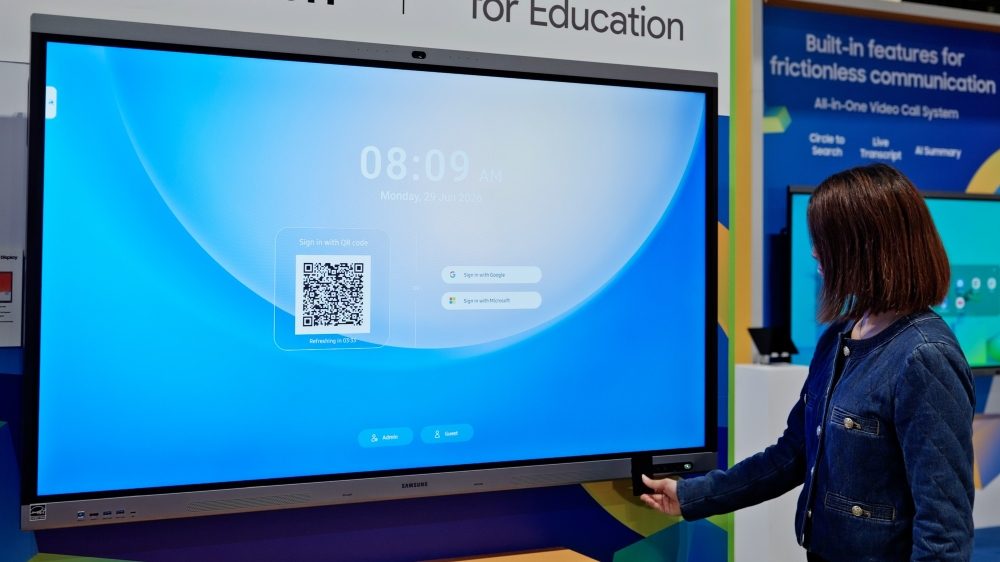
Samsung has detailed two software tools aimed at schools running shared interactive displays: Account Management Solution (AMS), which gives individual teachers a personalized, cloud-connected login on any compatible unit, and Samsung Education Portal, a centralized console for IT teams to manage accounts, enrolled displays and emergency alerts.
For anyone managing a fleet of shared displays, the core problem here is familiar even outside education: multiple users on one screen means either everyone works from a generic default setup, or someone has to manually reconfigure settings between sessions. Samsung's answer is a sign-in layer that follows the user rather than the device.
With AMS, teachers sign in using a QR code or an NFC-enabled ID card, which Samsung says removes the need to type a password in front of students. Once signed in, the display pulls a cloud-connected profile that includes files, apps, wallpaper, bookmarks and app shortcuts. The same profile also carries single sign-on access to Samsung's built-in AI Assistant app, including previously generated lesson summaries, according to Samsung.
Samsung quotes Jelena Živko, a Senior Instructional Technology Specialist with Volusia County School District, describing the benefit as not having to rebuild a workspace every time she teaches in a different room. That's the same pitch signage operators would recognize from hot-desking or shared-kiosk account systems in other verticals: reduce setup friction, protect each user's data from the next person who logs in.
On the management side, Samsung Education Portal lets IT staff register teacher accounts, enroll compatible displays, link NFC ID cards to users, and organize displays by location tags such as school, building or classroom. That's standard fleet-management territory for anyone running a CMS across many sites, though this is pitched specifically at account and device provisioning rather than content scheduling.
The more notable piece for a signage-industry reader is the emergency alert integration. Samsung Education Portal connects with notification platforms including InformaCast and Raptor, letting IT teams pre-build alert templates and push them to specific displays or display groups. When a signal comes in, the alert appears automatically on enrolled displays. Best Buy Education's Leah Fuller is quoted saying this gives staff, students and families assurance, though Samsung does not disclose adoption numbers or say how many notification platforms are currently supported beyond the two named.
A few practical gaps stand on their own. The announcement says the features are supported only on compatible Android-based Samsung Interactive Displays, with availability varying by model and region, and that NFC sign-in support varies by model too. Emergency Alert functionality also requires a paid subscription to a compatible notification platform, so schools without an existing InformaCast or Raptor contract will need to add one. Samsung does not give pricing, a rollout timeline, or say whether AMS and Education Portal work with non-Samsung displays in mixed-vendor deployments, which will matter for districts that don't run an all-Samsung estate.
The announcement in full
Reproduced from Samsung for reference. Digital Signage Magazine did not write the text below.
Shared interactive displays have become a central hub for classroom instruction, helping teachers access lesson materials and digital tools throughout the school day. However, when multiple teachers share the same display, keeping personal settings and classroom content private while ensuring a consistent experience can be challenging.
Samsung AMS (Account Management Solution) helps transform shared Samsung Interactive Displays into personalized, secure workspaces that follow teachers across classrooms. With seamless sign-in and cloud-connected profiles, teachers can quickly access their files, apps, and settings wherever they teach.
Watch the video below to see how Samsung AMS helps educators access personalized workspaces while enabling schools to centrally manage accounts, connected displays, and emergency alerts.
A Personalized Workspace That Follows Teachers Across Classrooms
With Samsung AMS, each teacher can access a secure, cloud-connected workspace on compatible Samsung Interactive Displays. 1 Instead of setting up their workspace every time they move to a different classroom, teachers can sign in with a QR code or NFC-enabled ID card 2 and immediately access their files, apps, and personalized settings, eliminating the need for password entry in the presence of students.
Once signed in, teachers can access the same personalized workspace on any compatible Samsung Interactive Display. Their cloud-connected profile automatically loads their files, apps, wallpaper, bookmarks, and app shortcuts, creating a carefully arranged teaching environment.
Jelena Živko, Senior Instructional Technology Specialist with Volusia County School District, highlighted how Samsung AMS helps teachers maintain a consistent experience as they move between classrooms.
“If I’m a math teacher and I have to teach in various classrooms, I can sign in, everything is ready to go, my lesson is there for me,” said Živko. “Being logged in with all of my credentials, I have access to all of my files, the tools, and my preferences. I can customize it to best fit my needs.”
In addition, Samsung AMS provides single sign-on access to the built-in Samsung AI Assistant app, 3 allowing teachers to access previous lesson materials, including AI-generated summaries, without signing in again. With their workspace available across compatible displays, teachers can move between classrooms without losing access to the tools and lesson materials they use every day.
Because classroom displays are often shared by multiple teachers, Samsung AMS helps protect each teacher’s workspace. Each teacher receives a secure and encrypted workspace, helping keep personal settings and classroom content protected from unauthorized access.
Simplifying School IT Management With Samsung Education Portal
As schools deploy more shared classroom displays, they need a simple way to manage teacher accounts, connected displays, and Emergency Alerts.
Samsung Education Portal centralizes these tasks, allowing IT teams to register teachers, enroll compatible Samsung Interactive Displays, and link NFC-enabled ID cards to user accounts from a single portal. 4 Displays can also be organized using location tags by school, building, or classroom, making large deployments easier to manage.
Samsung Education Portal also simplifies Emergency Alert management by integrating with major notification platforms, including InformaCast and Raptor. 5 IT teams can configure custom alert templates in advance and assign them to selected displays or display groups.
When an emergency signal is received, the appropriate alert automatically appears on enrolled Samsung Interactive Displays. This gives schools a visual way to share urgent information across displays throughout the building.
Leah Fuller, Sr. Manager Vertical Sales Leader from Best Buy Education, highlighted the impact of Samsung Education Portal’s Emergency Alert feature. “I think that gives a ton of assurance not just to staff but students and their families as well,” said Fuller.
By creating personalized classroom experiences for teachers and simplifying how shared displays are managed, Samsung AMS helps schools create more seamless and secure learning environments.
Supported on compatible Android-based Samsung Interactive Displays only. Feature availability may vary by model and region. ︎
NFC-enabled sign-in availability may vary by model. ︎
Supported on compatible Android-based Samsung Interactive Displays only. Feature availability may vary by model and region. ︎
Supported on compatible Android-based Samsung Interactive Displays only. Feature availability may vary by model and region. ︎
Emergency Alert feature is supported only for facilities with a subscription to a notification platform compatible with Samsung Education Portal. ︎